

Database Decryption
Encrypted databases are listed with the command:
exec master..dbd_listdb
Database decryption completely removes protection and encryption from a database previously encrypted by DbDefence.
A database can be decrypted using:
- Encryptor GUI
- Command line tool, API if a database is online
- SQL statement
- Command line tool,API if a database is offline
Using Encryptor GUI to decrypt a database
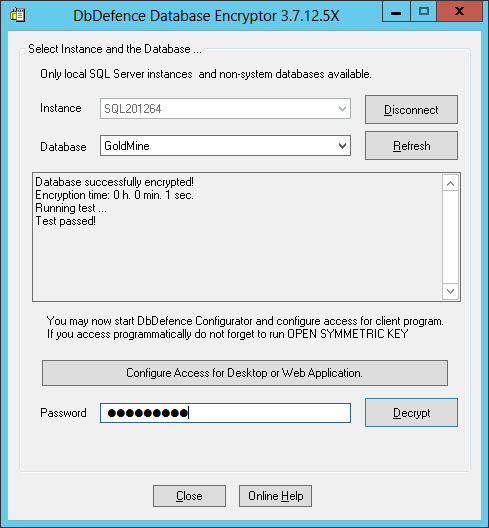
You can do it for the attached database and for the detached database files in emergent cases. To decrypt a currently attached database, you need to start Encryptor, select the database and provide the encryption password. Decryption is as fast as encryption.
Decrypting a database by SQL statement
Since version 9 DbDefence can decrypt a database from SQL query. Just add parametrer '-X' to dbd_encrypt_db.

Parameter -X means decryption. No need to specify other encryption options. Successful query completion doesn't necessary means successful decryption. Please check dbd_listdb or dbd_encrypt_db_info to see if the database was successfully decrypted.
Using Command line tool
If a database is online you can use the command line tool dbencrypt.exe or dbencrypt64.exe to decrypt a database:
dbencrypt64.exe -S .\MYSQL -d test_db -d StringPa$$word -X
Detached database decryption in emergent cases
Decryption can be applied to a detached database. We have implemented it in this way in order to make emergency decryption possible, for example, if DbDefence is not running on the system your database is attached to, but you need to work with the database immediately.
To decrypt the database you must provide at least one key file and the correct password. Decryption is not possible without one of these components:
dbencrypt.exe -X -p Strong1Passw -I dbfile.mdf -K dbfile.mdf.dbd_key
dbencrypt.exe -X -p Strong1Passw -I dbfile_log.ldf -K dbfile_log.ldf.dbd_key
dbencrypt.exe can be found in the DbDefence installation folder.
After decryption, the program renames the key file for each decrypted file. For example db.mdf.dbd_key becomes db1.mdf.dbd_key.renamed_by_decrypter.
Important: Once you have started the decryption process, it cannot be stopped and it can be a time consuming operation depending on the database size. If you terminate the process, or there is an interruption to the server's functionality, it is likely that your files will be corrupted. For this reason, we highly recommend that you backup any encrypted databases before you attempt the decryption process.